camtrapReport
Reproducible reporting for camera-trap monitoring data





camtrapReport converts camera-trap data in Camtrap DP format into two coordinated HTML outputs:
- a Data Status Check, which identifies issues in data completeness, consistency, annotation, and spatiotemporal coverage; and
- an Ecological Report, which combines selected ecological summaries, analyses, figures, tables, maps, metadata, and explanatory text in a configurable report.
The package focuses on the reporting workflow. It complements tools for camera-trap data management and specialised ecological modelling rather than replacing them.
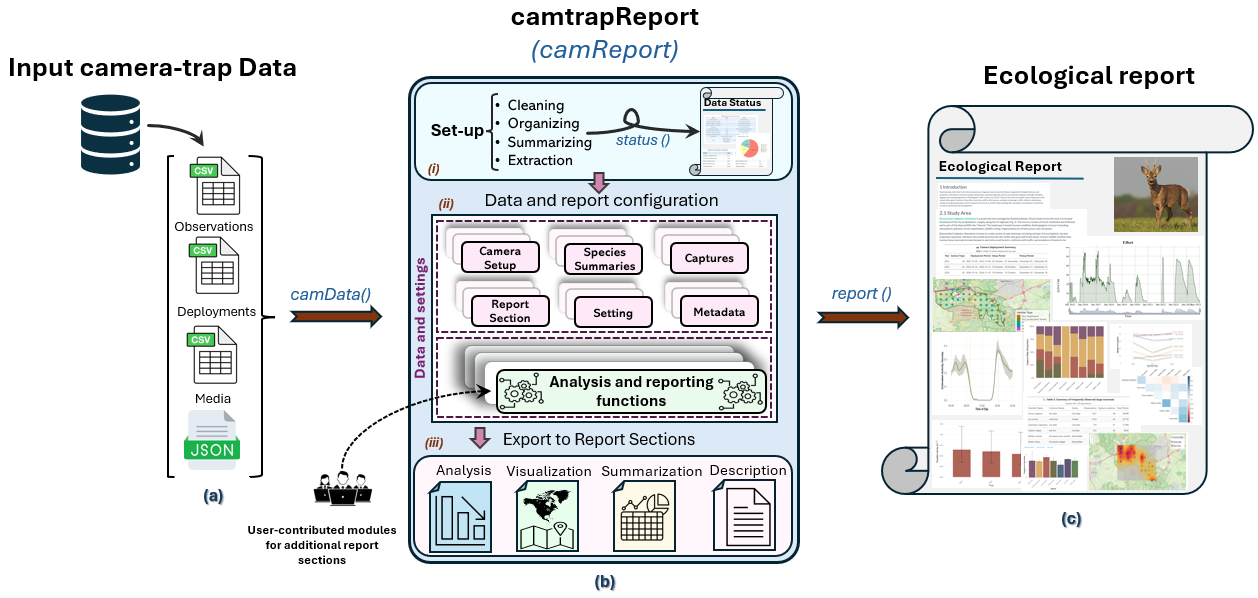
Workflow from Camtrap DP input through camtrapReport to the Data Status Check and Ecological Report.
Use in practice
Although camtrapReport has not yet been applied in a published ecological study, it has been developed and evaluated using real-world camera-trap monitoring datasets from multiple study sites across North America, Asia, Europe, Africa, and Australia. Evaluation involved both developer-led testing and independent users who applied the package to their own datasets and provided feedback. In Europe, this evaluation has drawn particularly on datasets available through camera-trap research networks, including the European Observatory of Wildlife network, which spans diverse geographic settings and monitoring designs.
Experience across these heterogeneous datasets has informed checks for metadata completeness and spatiotemporal coverage, improvements to report generation, and revisions based on user feedback. Related publications, presentations, and training activities are listed on the Resources page.
Installation
camtrapReport requires R 4.1.0 or later. Install it from GitHub with pak:
if (!requireNamespace("pak", quietly = TRUE)) {
  install.packages("pak")
}

pak::pkg_install(
  "spatialecology/camtrapReport"
)
To automatically check and install packages required by available, newly added, or updated report modules:
camtrapReport::install_all()install_all() scans the bundled and registered user modules and installs any missing dependencies automatically.
Quick start
This executed example uses a compact Camtrap DP dataset derived from GMU8_LEUVEN, together with bundled habitat data and a study-area boundary. The dataset is copied to a temporary directory because camData() may store processed files beside writable input data.
library(camtrapReport)

example_root <- tempfile("camtrapReport-example-")

dir.create(
  example_root,
  recursive = TRUE
)

copied <- file.copy(
  from = system.file(
    "external",
    "dataset",
    package = "camtrapReport",
    mustWork = TRUE
  ),
  to = example_root,
  recursive = TRUE,
  copy.mode = FALSE
)

habitat <- utils::read.csv(
  system.file(
    "external",
    "habitat",
    "habitat.csv",
    package = "camtrapReport",
    mustWork = TRUE
  )
)

study_area <- system.file(
  "external",
  "study_area",
  "study_area.shp",
  package = "camtrapReport",
  mustWork = TRUE
)
cm <- camData(
  data = file.path(example_root, "dataset"),
  habitat = habitat,
  study_area = study_area,
  update = TRUE
)
cm
#> Camera trap Object for the site : GMU8 LEUVEN
#> =====================================================
#> Total number of sequences       :  10182
#> Total number of observations    :  10798
#> Total number of animals         :  4693
#> Total number of detected species:  41
#> Date/time (years) with data     :  2018, 2019, 2020, 2021, 2022, and 2023
#> -----------------------------------------------------
camData() also accepts a Camtrap DP ZIP archive or an extracted Camtrap DP directory. Habitat data and a study-area boundary are optional.
Generate a Data Status Check
status() generates a Data Status Check report that provides a structured assessment of whether the camera-trap dataset is ready for ecological reporting. It summarises five core areas: spatial quality, temporal coverage, essential data availability, classification and validation, and annotation quality. The report also summarises observation types by capture method and concludes with an overall data-quality classification, highlighting issues that require attention and providing clear guidance to users and data owners on what should be corrected or improved before ecological analysis. The function returns the path to the generated HTML report; set view = TRUE to open it in a browser.
status_file <- status(
  cm,
  view = FALSE
)Generate an Ecological Report
report() generates a structured Ecological Report that brings together the selected analytical modules in a single, reproducible document. Depending on the available data and selected report sections, it can include information on sampling effort, species richness and occurrence, co-occurrence, activity patterns, habitat use, abundance and density, species accumulation, and spatial patterns. Analytical results are integrated with tables, figures, maps, and automatically generated narrative text that adapts to the underlying data and metadata, providing an interpretable overview of the camera-trap monitoring dataset. Because the report is modular, users can select, omit, reorder, or extend sections according to their data and reporting needs. The function returns the path to the generated HTML report; set view = TRUE to open it in a browser.
report_file <- report(
  cm,
  view = FALSE
)Configure a report
Inspect report metadata and choose which sections to include:
info(
  cm,
  name = c("title", "authors")
)

section_names()

selected_sections <- section_names(
  keep = c(
    "introduction",
    "methods",
    "study_area",
    "sampling",
    "effort"
  )
)

sections(
  cm,
  selected_sections
)
Reports can also be configured by taxonomic group, survey year, and observation-count threshold. See the Ecological Report and Module management guides for further examples.
Use gui(cm) to configure and generate reports through an interactive interface.
Interpretation and reproducibility
A successful Data Status Check confirms that the implemented data checks were completed; it does not establish that the survey design or data are suitable for a particular ecological analysis. Results should be interpreted in relation to sampling effort, detectability, season, habitat, and method-specific assumptions.
For reproducibility, retain the input data, optional inputs, analytical settings, selected report sections, and relevant package versions. General guidance is available from the Reproducible Research CRAN Task View.
Reports may contain maps or derived results that reveal sensitive species locations. Review all content before sharing a report.
Example-data provenance
The bundled example dataset is derived from the GMU8_LEUVEN Camtrap DP dataset, published by the Research Institute for Nature and Forest (INBO) through GBIF. It contains 8 derived location identifiers, 87 deployments, 15,492 retained media records, and 11,092 observation records. The relationship-preserving subset is intended for demonstration and software testing, not ecological inference. Its preparation and media-reduction rules are documented in the example-data README.
Relationship to other camera-trap packages
Several R packages support related parts of camera-trap workflows:
-
camtrapdpreads, validates, and transforms Camtrap DP datasets; -
camtraptorsupports exploration and visualisation; and -
camtrapRandctprovide broader data-management and analysis workflows.
camtrapReport complements these packages by integrating data-status checks, selected ecological analyses, figures, maps, tables, metadata, and explanatory text within a configurable reporting workflow. Its extensible module framework allows users to incorporate additional analyses and report components without modifying the core package. To my knowledge, it is the first R package designed specifically to automate the generation of both data-status and ecological reports from camera-trap data.
Author
camtrapReport is developed and maintained by Elham Ebrahimi.
Contributing
Bug reports, feature requests, documentation improvements, code contributions, and new report modules are welcome. Please read the contributing guidelines and Code of Conduct before contributing.